Quick answer
A photo gets cropped when its aspect ratio, the shape of the image, differs from the shape of the print. A phone photo is usually 4:3, but an 8 × 10 print is 4:5, so filling the paper edge to edge means trimming part of the long side. To avoid it, choose a print size with the same ratio as your photo, or ask for a border.
- Phone photos (4:3) match 9 × 12, 12 × 16, 15 × 20, 18 × 24 and 24 × 32 prints.
- Camera photos (3:2) match 8 × 12, 12 × 18, 16 × 24, 20 × 30 and 24 × 36 prints.
- 8 × 10, 11 × 14 and 16 × 20 prints crop both.
What is an aspect ratio?
An aspect ratio describes the shape of an image as the relationship between its long and short sides. A 4:3 photo is four units long for every three units high, whether it measures 4,032 × 3,024 pixels or 12 × 9 inches. Two sizes with the same ratio are the same shape; only the scale changes.
Most phones save photos at 4:3. Most DSLR and mirrorless cameras save at 3:2. Square (1:1) and wide (16:9) options are also common in phone camera settings.
Compare 3:4 and 4:5 print shapes
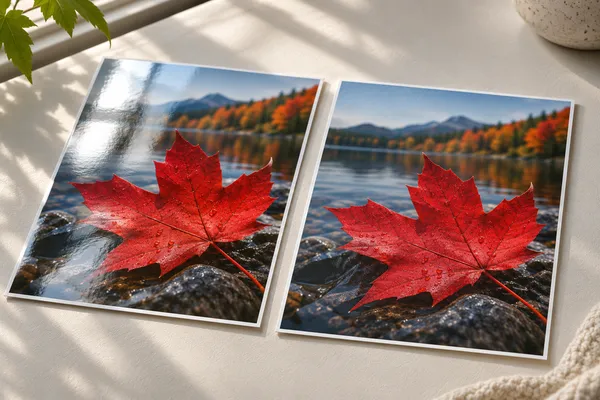
A photo with a 3:4 aspect ratio fits a 9 × 12 print without trimming for proportion. An 8 × 10 print has a 4:5 ratio, so the print must either trim part of that same photo or leave a border. The example below shows both shapes in landscape orientation.
Aspect ratio chart for common print sizes
| Print size (inches) | Shape | Matches |
|---|---|---|
| 9 × 12, 12 × 16, 15 × 20, 18 × 24, 24 × 32 | 3:4 | Most phone photos |
| 8 × 12, 12 × 18, 16 × 24, 20 × 30, 24 × 36 | 2:3 | Most DSLR and mirrorless photos |
| 8 × 10, 16 × 20 | 4:5 | Neither exactly; both get trimmed |
| 11 × 14 | about 4:5.1 | Neither exactly; both get trimmed |
| 8.5 × 11 | about 4:5.2 | Neither exactly; both get trimmed |
| 13 × 19 | close to 2:3 | Camera photos, with a small trim |
| 10 × 10, 12 × 12, 16 × 16 | 1:1 | Square photos |
| 8 × 16, 10 × 20, 12 × 24 | 1:2 | Panoramas and wide landscapes |
How much of my photo will be trimmed?
The bigger the difference between the two shapes, the more is trimmed. These figures assume the print is filled edge to edge with the photo centred:
| Photo shape | Print shape | Amount trimmed |
|---|---|---|
| 4:3 phone | 4:5 (8 × 10, 16 × 20) | about 6% of the long side |
| 4:3 phone | 2:3 (8 × 12, 12 × 18) | about 11% of the short side |
| 4:3 phone | 1:1 square | 25% of the long side |
| 4:3 phone | 1:2 panoramic | about 33% of the short side |
| 3:2 camera | 4:5 (8 × 10, 16 × 20) | about 17% of the long side |
| 3:2 camera | 3:4 (9 × 12, 12 × 16) | about 11% of the long side |
| 16:9 wide | 4:5 (8 × 10, 16 × 20) | about 30% of the long side |
Cropping also reduces the pixels left to print. Use the remaining pixels when you check how large you can print a photo from your phone.
How do I keep the parts that matter?
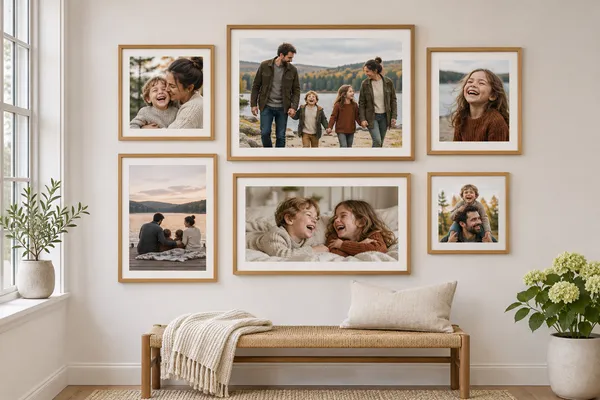
Cropping matters most when something important sits near an edge. In a landscape group photo, an 8 × 10 crop might cut into someone standing at the far left or right. Faces, hands and lettering close to the border are the most common casualties.
With photo printing and enlargements, a 3:4 glossy print size can preserve a phone photo’s original shape. For canvas printing, also ask how the edges will be treated: on a wrapped canvas, part of the image can turn around the sides.
Square prints suit subjects that sit comfortably in the centre. A 1:2 panoramic print suits a wide image with room above and below the subject.
Should I crop, add a border or change the size?
You have three ways to deal with a shape mismatch:
- Choose a matching size. Pick a print with the same ratio as your photo. Nothing is lost.
- Fill the print and crop. The photo covers the whole paper, and you decide which edges to lose.
- Fit the photo with a border. The whole image is kept, with a white margin on two sides.
If you own a frame already, the frame decides the print size, so options 2 and 3 are the ones to compare.
Measure the opening before you choose
A frame’s listed size describes the print it holds, but a mat or the frame’s lip covers a little of each edge. Measure the visible opening and compare it with your photo’s shape. When you request a quote, tell us whether filling the print or preserving the entire image matters more to you, and share both the listed size and the visible opening.
Frequently asked questions
Why did my print cut off part of someone’s head?
The photo’s shape differed from the print’s, and the trim fell on that edge. Choose a matching size, or ask for the crop to be positioned so faces stay in the frame.
Can I print the whole photo on an 8 × 10?
Yes, with a border. The image is scaled to fit inside the 4:5 shape and the leftover space stays white.
Which print size matches my iPhone photo?
iPhone photos are 4:3 by default, so 9 × 12, 12 × 16, 15 × 20, 18 × 24 and 24 × 32 match without trimming.
Does cropping lower the print quality?
It removes pixels, so a heavily cropped photo has less detail to enlarge. Check the remaining pixels against your print size.